 Statico
Static vs dynamic website: Which is right for you?
Compare static and dynamic architectures across speed, hosting costs, contact forms, blogs, and customer logins to pick the right setup for your business.
If you’re deciding whether a static or dynamic website is right for your business, start with what visitors need to do. If your website describes your services, shows your work, and collects inquiries, a static site may be all you need. If visitors need to see their orders, pay for purchases, or access private documents, you’ll need dynamic features. But a contact form or a frequently updated blog doesn’t automatically require a dynamic website.
Company size and page count matter less than how the site works for visitors and who updates the content.
What’s the difference between static and dynamic websites?
A static website serves pages that have already been prepared. A dynamic website can generate pages on the server in response to a request. HTML is the markup a browser receives to display a page. The key difference is when that page is created, not how modern the site looks.
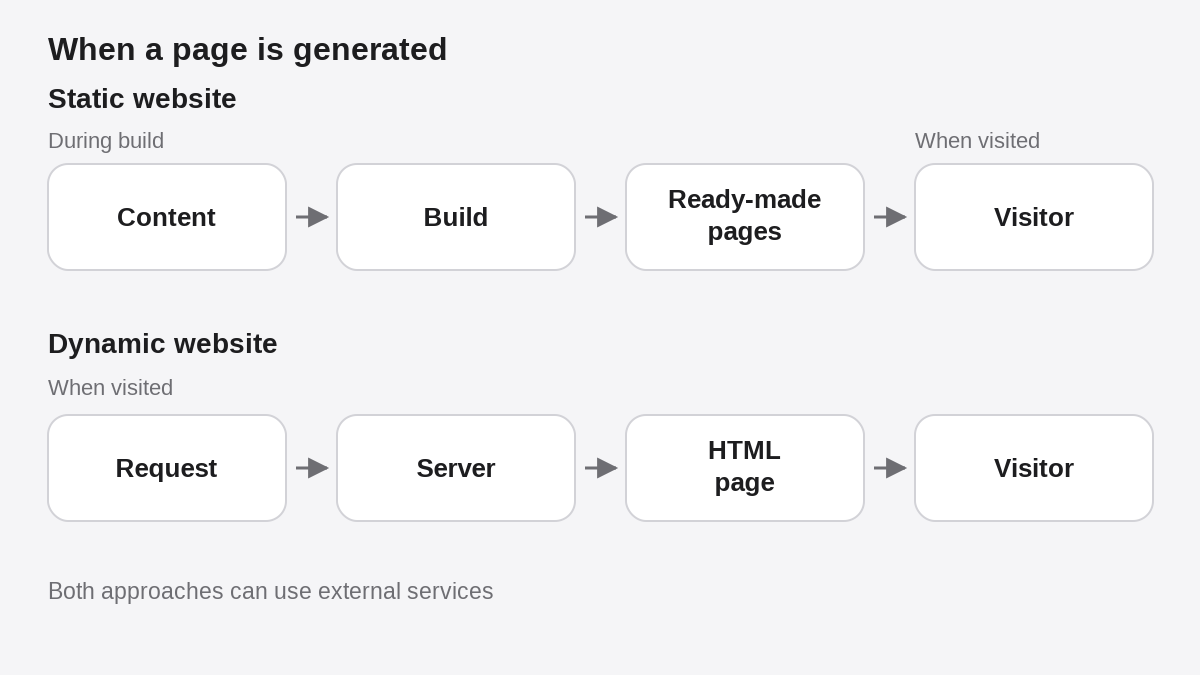
The main difference is when the page is prepared.
In a modern static project, pages are usually prepared during a build. The system combines content, templates, and images to produce a ready-to-serve version of the site. When someone opens a page, the CMS doesn’t need to query a database and assemble it again. Our guide to static websites explains how they work in more detail.
A dynamic website can retrieve data when someone makes a request. For example, it can check who’s signed in and show that customer their own documents. But it can also assemble the exact same About page every time. Personalization isn’t a requirement for a dynamic site.
There are in-between approaches, too. A WordPress site with caching, for example, can serve saved copies of pages instead of rebuilding them each time someone visits. And a static page can request up-to-date information from a separate service.
So “built with WordPress” or “built with Astro” doesn’t tell you the whole story. You need to know which parts are prepared ahead of time and which are generated on request. “Static” doesn’t mean no animations, no buttons, or an outdated design.
Which website tasks need dynamic features?
It’s more useful to list what visitors need to do than to list the sections on your site. A page describing a service and a page showing a customer’s personalized balance might look equally simple, but they involve different technical tasks.
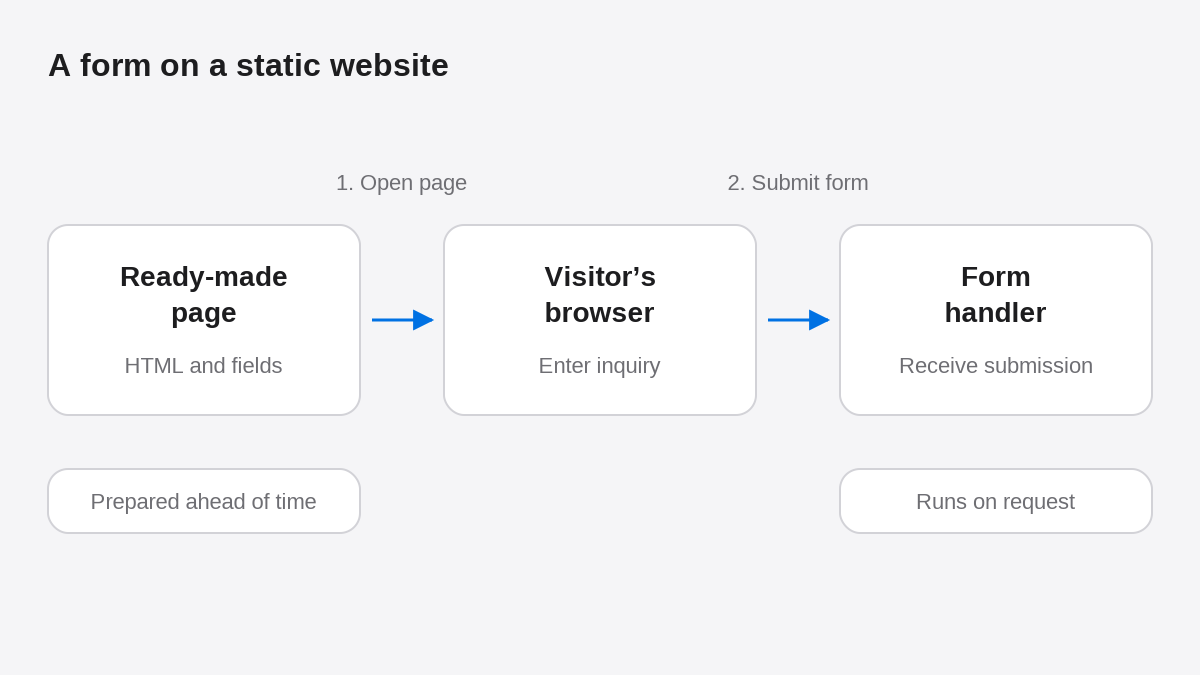
A form needs a handler to process submissions, but the page itself can still be static.
| Website task | What usually works | What to clarify |
|---|---|---|
| Services, contact information, portfolio | Static website | How staff will update information |
| Blog with regular posts | Static or dynamic | How easy it is to edit and publish posts |
| Contact form | Static page with a separate handler | Where submissions go and how they’re protected |
| Catalog without checkout | Often a static foundation | How data is updated and whether it must be current when visitors view it |
| Store with payments | Dynamic commerce system | Cart, payments, orders, and order status |
| Customer account | Dynamic features | Sign-in, access permissions, and personal data |
Forms are a good example of why a strict static-versus-dynamic split can be misleading. The fields can sit on a ready-made static page, while a separate server-side handler processes the submission. We explain the details in our article on forms without a CMS.
A price calculator or a filter for a short list can run in the visitor’s browser using JavaScript, code that runs on their device. But if a calculation needs private rates from an internal system, it has to contact a server.
You can combine the two approaches. Astro, a framework for building websites, can prepare some pages ahead of time and generate others on request, as explained in its on-demand rendering documentation. Interactive features can also run inside a ready-made page. That’s the idea behind Astro’s islands architecture.
Being able to build this kind of system doesn’t mean it’s part of a standard site migration. An online store or customer portal needs its own design and planning, even if its public pages are static.
Can a static website be updated frequently?
A news post published today can still be a static page. The page is prepared and published when the post goes live, and readers receive the finished result. A blog doesn’t need to rebuild the post every time someone opens it just because new posts appear often.
Booking an appointment is different. If two people try to book the same time, the system needs to check availability and save the booking correctly. What matters here is having accurate data during the transaction, not how often someone edits the text.
How you edit a site and how it serves pages are separate decisions. A static site can have a content editor. In our article on editing a website without a CMS, we compare file editing, CMS tools, and AI tools.
For a business owner, the editor’s name matters less than the actual workflow. Ask the developer to show you how an employee will add a post with a photo, change a service price, and preview the result before publishing. Have them demonstrate the tasks your team needs to do, not just a generic sample page.
If several people need to approve copy, ask whether you can save a draft and show it to a manager without publishing it. If information sometimes needs an urgent update, find out who can make that change in the evening when the developer isn’t available.
A poorly set up static project can leave you dependent on a developer to change every comma. But having WordPress doesn’t guarantee that editing will be easy, either. The text you need might be buried in theme settings or inside a page builder.
I wouldn’t switch platforms just to use newer technology if your team already works comfortably in the current system. First, figure out what real problem a move would solve.
Speed, security, and SEO: realistic expectations
A static foundation has a straightforward advantage: the server doesn’t need to run CMS code or query a database to serve a prepared page. There are fewer systems involved in delivering the page. But large images, heavy video, and third-party scripts can slow down a static site, too.
A dynamic site with good caching can also be fast. So “static is fast, WordPress is slow” is too simplistic to guide a decision. If load time is the problem, start by measuring Core Web Vitals and finding the cause rather than ordering a migration without checking.
Security works much the same way. If the public site no longer uses a CMS, its login page and executable plugins are no longer potential points of attack. But access to the domain, hosting account, code repository, and connected services still needs protection. And forms need spam protection regardless of how the pages are prepared.
If a static site gets its content from a separate CMS, that CMS still needs maintenance and security updates. It doesn’t disappear just because visitors don’t connect to it directly.
The technology itself doesn’t guarantee SEO results. Google notes that good Core Web Vitals don’t guarantee top rankings. A fast page helps visitors, but it doesn’t replace a useful answer to their question.
That’s why I’d compare specific implementations: what loads, which systems are exposed to the internet, and who’s responsible for them.
How do static and dynamic website costs compare?
Static files can be inexpensive to host, and sometimes there’s no hosting charge. For example, Cloudflare says that requests to static Pages assets are free and unlimited as long as they don’t invoke server-side functions. That doesn’t mean every service connected to your site will be free.
For a useful cost comparison, include the initial build or migration, domain, editing, maintenance, and external services.
Even if two proposals list the same expenses, they may not offer the same thing. One might include an easy-to-use editor and a working inquiry form, while the other delivers only ready-made pages. You’ll see the difference after launch, when you need to update a service or fix a form that’s stopped working.
Also ask what you’ll have when the work is done. Will you have access to the source code and accounts? Can you hand the site to another developer? Who maintains an external booking system? These questions matter for both static sites and CMS platforms.
A cheap migration isn’t a good deal if it breaks the way your team publishes news. On the other hand, maintaining a complex CMS for a contact page and a few service descriptions may create unnecessary work.
How to choose before work begins
Start with the actions your site must support. Don’t just say “there’s a customer area.” Say “customers sign in with a password and download only their own documents.” Don’t just say “there’s booking.” Say “visitors choose an available time, get a confirmation, and staff can see the booking.”
That description helps separate informational pages from tasks that need a server. Then ask the developer to spell out in the proposal:
- Which pages will be prepared ahead of time.
- Which features need a server or an external service.
- How staff will edit and review content.
- Who will support each part after launch.
It’s especially useful to ask: what stops working if an external service is unavailable? The page might still load, while the form or booking system doesn’t. That matters more than the name of the framework.
If your site mainly helps people choose a service and contact you, I’d start with a static option and add only the features you really need. If the site’s main purpose is handling orders, accounts, and up-to-date personal data, choose a dynamic system designed for those tasks. The public-facing pages don’t have to use the same setup as the private parts.