 Statico
How to edit a website without a CMS
Compare direct Git file editing, headless/static CMS tools, and AI-assisted editors like Statico Atelier to safely update copy and preview changes.
Need to edit a website without a CMS? You don’t have to call a developer every time you change your business hours, add a service, or update a photo. You can edit files, use an editor with familiar fields, or describe the change to an AI tool in plain language.
A CMS, or content management system, for a static site may be worth considering if you publish content every day and need a structured workflow. For a typical small-business site with occasional updates, setting one up is usually overkill if you have a well-tuned AI editor.
What exactly will you be changing?
A static site serves visitors pages that have been prepared in advance. To update one, you change the source content and publish a new version. That doesn’t necessarily mean rewriting HTML by hand. Text can be stored separately from the design, and an editor can show you a familiar field such as “Service description.”
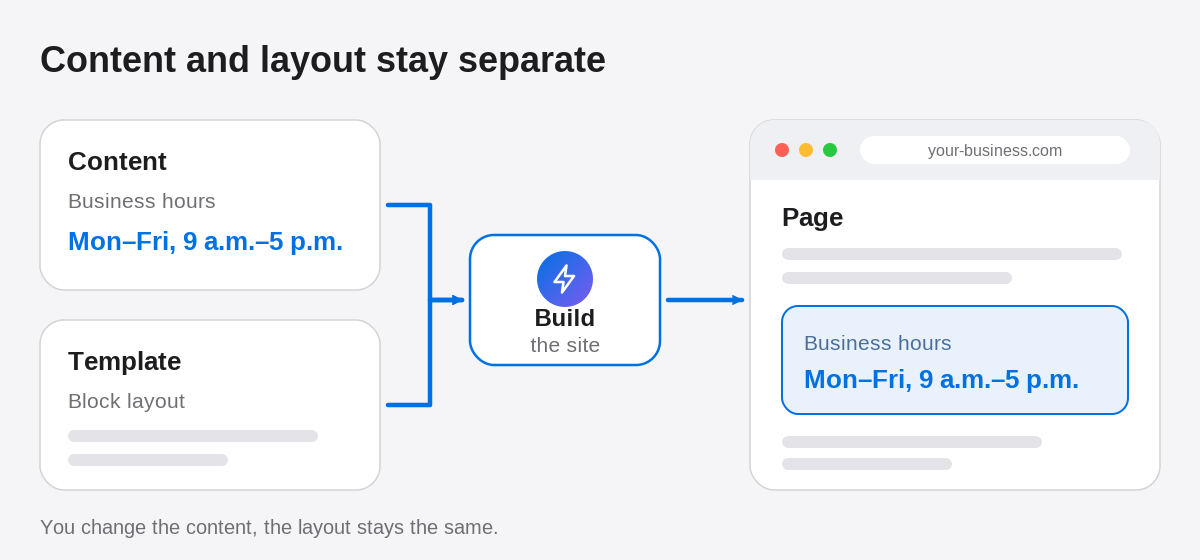
One way to structure a site: content is stored separately from the template. Changes still need review.
How content is stored matters more than whether you call a site “static.” A project may keep text and data separate from the templates that arrange page elements. In that setup, changing business hours doesn’t require editing the layout, whether the person making the change is a developer or an AI tool.
Choosing Astro or another tool doesn’t automatically guarantee this separation. Before taking over a site, find out where its text, images, and shared page elements live.
Different changes call for different checks:
- For a price change, typo fix, or rewritten paragraph, check the wording. Also check whether a long headline fits on a phone.
- For a new image, check its dimensions, crop, and accessibility text in the
altattribute. - A phone number or address may appear on several pages. Check each place where it’s used.
- Adding a section, rearranging blocks, or changing navigation is more than a content edit.
For example, a new team photo might look great on its own but not work in a narrow horizontal block. Open the page after replacing it and check how it looks.
Four ways to edit a static website
Each option has a different upfront cost. You can spend your own time editing files, pay someone to set up an editor, or ask a developer to make changes. AI editors have their own pricing, too. Comparing only the cost of a single edit wouldn’t tell the whole story.
| Method | What the site owner does | Access needed | How to review | What you pay for |
|---|---|---|---|---|
| Edit files by hand | Find and change the text or image, then save | Project files and publishing system | On a separate preview, if one is set up | Your time, and possibly setup |
| Ask a developer | Describe the change and review the result | The developer needs access to the project | Using a link to a test version | The work and, if agreed, ongoing support |
| Use a static-site CMS | Fill in fields or use a visual editor | An editor account; the integration needs to be set up separately | Using the CMS and publishing system, if a test version is configured | Setup and possibly a service plan |
| Use an AI editor | Describe the change and review the result | The tool needs access to the source files | Using a preview of the proposed version, if available | Whatever the tool charges; you still need to review the result |
Editing files by hand isn’t just for programmers if the content is easy to find and changes are rare. But I wouldn’t call it completely no-code: you may see markup or special characters next to the text, and deleting them by accident can cause problems.
For example, GitHub lets you edit files right in your browser. GitHub stores project files and their change history in a repository. A saved change is called a commit. But the Preview button in a file editor isn’t the same as viewing a working website, and saving a file doesn’t guarantee that the change has been published.
A developer is useful when a change goes beyond content. Reworking navigation or adding complex form behavior is different from changing an address. A developer doesn’t have to be a permanent go-between, either. You can ask them to set up a way for you to make routine edits yourself instead of hiring them every time you need to change a comma.
When does a static-site CMS make sense?
Several tools help teams manage content on static sites, including TinaCMS, Pages CMS, Decap CMS, and CloudCannon. They offer features such as forms, visual editing, and saving changes to Git.
For example, a developer can connect a “Business hours” field to the relevant data in your project. You update that field without rebuilding the page template or asking a tool to figure out which part of the page to rewrite.
A static-site CMS makes the most sense when your team needs a structured workflow to publish content every day, especially if several people edit the site or regularly add pages with the same fields. The form defines the scope of a typical edit, so editors don’t have to explain what to change from scratch each time.
The tradeoff is the initial setup. Don’t expect a CMS to understand any website automatically. Someone needs to define the fields, connect the project, set up permissions, and configure publishing. Features and pricing vary from one tool to another.
A CMS doesn’t prevent mistakes, either. You can still choose the wrong photo or enter the wrong price.
For a typical small-business site with occasional updates, a separate CMS is usually overkill. With a well-tuned AI editor, describing the change and checking the result can be simpler than setting up fields for every possible task. A CMS can be worth the setup when a team needs a structured workflow for daily publishing, not just occasional edits.
How to give a person or AI a clear task
An AI editor can help when describing the change is easier than finding it in a project. But “update the contact page” is too vague. It doesn’t say what’s out of date or which information is correct.
A good task includes the page address, the new content, and the limits of the change. Here’s a made-up example:
On the /contacts/ page, change the business hours to “Monday through Friday, 9 a.m. to 5 p.m.” Don’t change the address, phone number, map, or any other text. If the business hours also appear in the footer, update them there too. Keep the existing design.
A photo needs a different kind of instruction:
On the /about/ page, replace the team photo with the new image I provided. Keep the block the same size. Check that the crop doesn’t cut off anyone’s face on a phone. Don’t change the caption or surrounding sections.
How you provide the image depends on the tool you’re using.
Before you start, decide who will write the final copy. “Replace this paragraph with the following text” and “rewrite the service description” are different assignments. With the second one, you’ll need to check the meaning as well as the layout. Make sure the new copy doesn’t introduce services, terms, or promises your business doesn’t actually offer.
Start with one small, complete change. For example, update your contact details and check them. It’s harder to review the result and find the source of an error if one request combines a phone number change, a homepage rewrite, and a new menu design.
How to review a change before publishing
A safe workflow is to propose the change, open a separate test version, and update the public site only after you’ve checked it. What matters to you as the site owner is the working page in a browser, not a message saying “file saved successfully.”
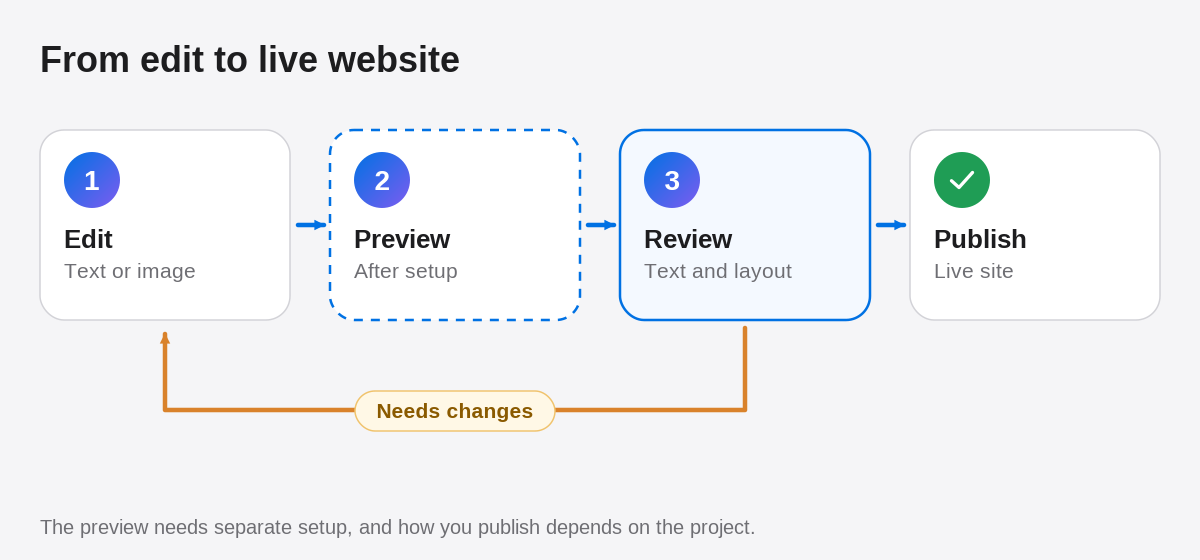
A preview must be configured separately. The publishing process depends on the project.
For example, Cloudflare Pages supports separate preview deployments, which are test versions of a site available at their own addresses. With the right setup, you can review changes from a separate project branch without changing the main domain. This is a feature of the publishing system, not an automatic part of every static site.
For a small edit, use a short review checklist:
- Open the page and compare the wording and numbers with the task.
- Check it on a phone. Make sure headlines fit, buttons are easy to use, and text doesn’t overlap images.
- Confirm you have the right image, the crop works, and the
alttext describes the image’s purpose. - Test changed links, including phone numbers and email addresses.
- If you changed the address in the footer, check whether it’s updated on other relevant pages.
- Make sure nearby sections are still there and that content and design outside the task haven’t changed.
Find out in advance how to restore an earlier version, too. Change history is useful, but you also need to know who can roll back a change and how they’ll do it. If you’re planning routine updates, our website maintenance guide is a useful next step.
How we handle edits in Statico Atelier
In Statico Atelier, we’ve separated the task, review, and publishing steps so you can check the result before updating your site. Describe the change in your own words. An AI agent works in a copy of the repository and creates a preview. After you review it, you can start publishing with one click by creating a commit or a pull request, a request to merge changes into a project.
In the preview, you can open the page and check it using the same list you’d use to review a person’s work, rather than relying on the agent’s “all done” message.
Connecting a project and creating previews in Atelier are free. You pay for completed edits from your balance. Atelier also works with other static and Astro projects, so you don’t need to move a site to us to connect it.
In an Astro project, content structure determines how easily pages can be edited. Pages that share a format, such as blog posts or services of the same type, are organized as content collections. They share a single template, while each page’s copy lives in its own Markdown or text file. Unique pages such as the homepage keep their layout and text together.
That means the right way to edit depends on the page. In Statico Atelier, an agent can safely update the text of a collection page without touching its underlying design template, keeping the layout intact.
When to keep a CMS
I wouldn’t choose a tool based on “CMS is outdated” or “AI can do everything now.” I’d look at how people actually work with the site.
If your team publishes content every day using the same fields, a form might be a better fit: headline, author, date, image, and text. If several people contribute and you need approvals or different access levels, the editorial workflow matters more than the convenience of making a one-off edit.
A CMS and a static site aren’t mutually exclusive. You can keep managing content while serving visitors pages that have been built in advance. Sometimes you can connect a suitable CMS to an existing static project.
For a small-business site that changes a few times a year, a well-tuned AI editor is usually simpler than setting up a CMS. Frequency isn’t the only factor, though: consider how many people are involved and what work they do.
Before you choose, try one real task: update the hours, replace a photo, or revise a service description. Test the entire process: who makes the change, where you review it, how you publish it, and how you restore the previous version. That gives you a better sense of the work you’ll repeat than a polished tool demo does.