 Statico
Astro forms without a CMS: what still works
Contact forms, analytics, and multi-language pages work seamlessly on static Astro sites. See how serverless handlers replace a database and what to test.
Astro forms without a CMS can still collect leads, while separate tools track visits and serve multiple languages. You don’t need to keep a CMS, a database, and a collection of plugins just to handle those jobs. But I wouldn’t trust the promise that you can simply export the HTML and everything else will work on its own. Form delivery, analytics, and the connections between language versions all need to be set up and tested.
The confusion starts with the word static. It describes how pages are prepared, not a ban on interacting with visitors. After a move to Astro and Cloudflare, you’ll need to know where server-side code comes in and what to check before switching your domain.
What stays static, and what runs separately
Astro can build pages ahead of time into ready-to-serve HTML files. When a visitor opens the Services page, the host serves the finished page instead of starting a CMS to assemble it from a template and database entries.
That doesn’t stop the browser from running JavaScript, submitting a form, or loading a page in another language. In a CMS, these tasks may have lived under one roof. On a static site, each has its own mechanism.
| Task | How it often works in a CMS | What handles it on a static site |
|---|---|---|
| Submit an inquiry | A form plugin and server-side handler | An HTML form and a serverless function or third-party service |
| Count visits | A plugin adds an analytics tag | The analytics tag is added to the page code |
| Show another language | A multilingual plugin selects a translation | Separate pages with their own URLs and links to each other |
A serverless function is a small handler that runs when requested. It can receive a name, phone number, and message, validate them, and pass them along. The page itself can remain static.
For a service business website, I think this separation makes sense. You don’t need a CMS to show your office address. You do need a way to receive an inquiry. Those are different jobs, and they don’t have to depend on the same system.
How a static site contact form sends email
A form is just fields and a button on a page. It doesn’t send email by itself. Something else handles delivery: server-side code, an email service, or a combination of the two.
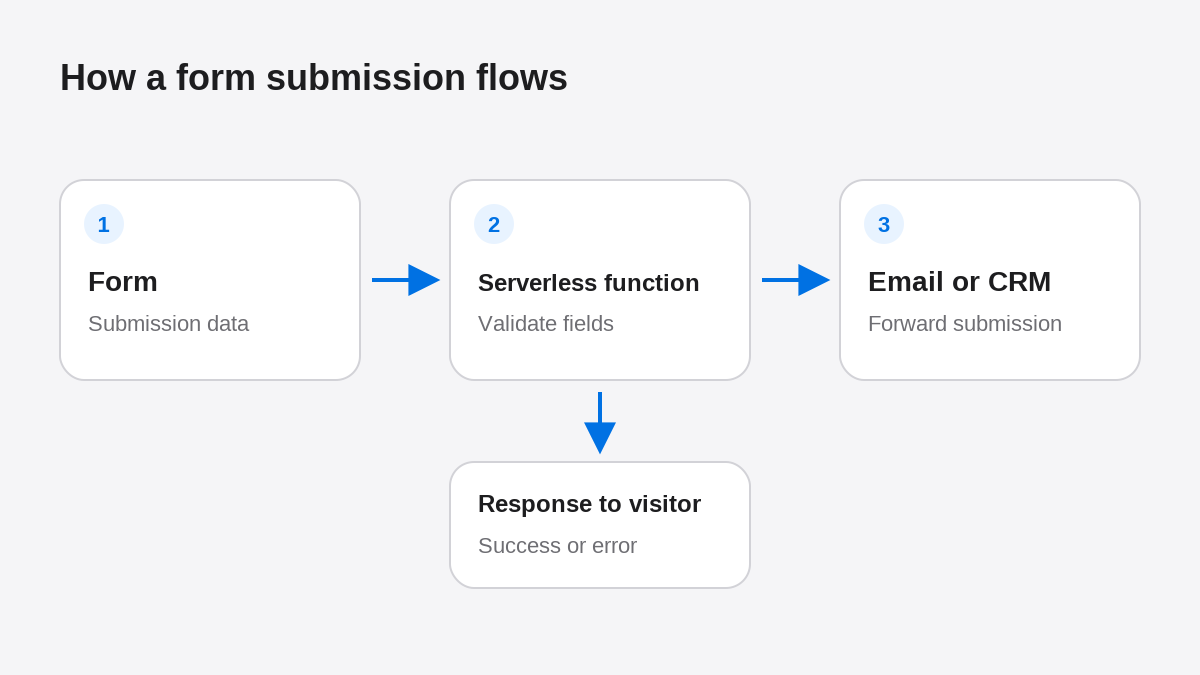
The static page displays the form, and a handler receives and forwards the submission.
On a static site, the flow might look like this:
Form on the page → serverless function → email or CRM → response to the visitor.
On Cloudflare, you can build that handler with Pages Functions. Cloudflare also offers a Static Forms plugin that passes HTML form data to a developer’s handler. The plugin doesn’t send email by itself. The handler’s code decides what to do with the fields: save them, send an email, or pass them to another system.
Before a migration, find out where submissions will go and how you’ll know if something fails.
A well-configured form validates required fields on the server, keeps email-service keys out of visitors’ browsers, and shows a success message only after the handler accepts the submission. If the request fails, visitors should see a clear message instead of having to guess whether anything went through. Even a successful response from the handler doesn’t guarantee that an email will reach the inbox.
Spam protection is another separate concern. Cloudflare Turnstile, for example, checks requests. But adding the widget isn’t enough: the token it returns must be validated on the server. And no spam tool promises to stop every unwanted submission forever.
At Statico, forms send submissions by email through serverless functions. We can also set up delivery to a CRM on request. That doesn’t mean every project uses Static Forms or Turnstile. What matters is checking that the submission gets through and that the visitor sees the right message.
What Cloudflare’s free plan means for forms
Ready-made pages and serverless functions have different terms. Check the distinction in advance, especially if free hosting is a major reason for moving.
Under Cloudflare Pages’ pricing, requests for static assets are free and unlimited as long as they don’t invoke Functions. Serving a page, image, or stylesheet doesn’t by itself run a form handler.
Serverless functions have a separate quota. On the free Pages plan, Pages Functions use the shared Workers Free quota of 100,000 requests per day. Other handlers in the account can use that quota too, not just the contact form.
That does not mean 100,000 emails are guaranteed to arrive. Calling a function and delivering an email are separate operations. An email provider may have its own limits, pricing, and rules. Failed or unwanted requests to the handler can also use up its quota.
For a typical contact form, this setup is convenient: you don’t have to run an entire CMS just to process a few fields. But before launch, find out what sends the email, what terms that service has, and where to look if delivery stops working.
One more practical detail: the form handler should run only where it’s needed. If a developer routes every site request through Functions, don’t assume the free static asset terms apply to all of them. Check the project configuration, not just the name of the hosting provider.
How to add analytics without a CMS plugin
An analytics plugin in a CMS often does one simple job: add a tracking tag to pages. Moving away from a CMS doesn’t make the tag useless. You can add it to an Astro layout so it appears on the relevant pages when the site is built.
For example, Cloudflare Web Analytics uses a JavaScript snippet and reports visits and real-user experience metrics. The service is free. You don’t have to move your DNS to Cloudflare or route site traffic through it. It works independently of your CMS.
Google Analytics also doesn’t require a WordPress plugin. Google provides instructions for setting it up with the Google tag. Which analytics tool you choose depends on what data your business needs, not where the page text is stored.
But moving an analytics tag is not the same as preserving your measurement setup. Suppose you used to track form submissions by counting visits to a thank-you page. On the new site, the form displays a message below the button instead. A visitor submits an inquiry and the email arrives, but the old conversion goal no longer fires.
Before the move, write down:
- Which analytics account and tracking tag the site uses, and who has access.
- What counts as a result: a form submission, a phone tap, or a file download.
- How each action is recorded.
- Which consent settings need to stay in place.
A note on privacy: Cloudflare says Web Analytics does not collect or use visitors’ personal data. That statement applies to this specific service. It isn’t a legal assessment of your whole site. If you also use advertising scripts or other analytics tools, review those separately.
Before and after launch, check more than whether the code appears in the HTML. Make sure a test visit and the events you care about show up in the analytics system you chose.
How multilingual Astro sites work
A multilingual site doesn’t have to translate a page as someone opens it. You can prepare a separate page for each language in advance and connect the pages with a language switcher.
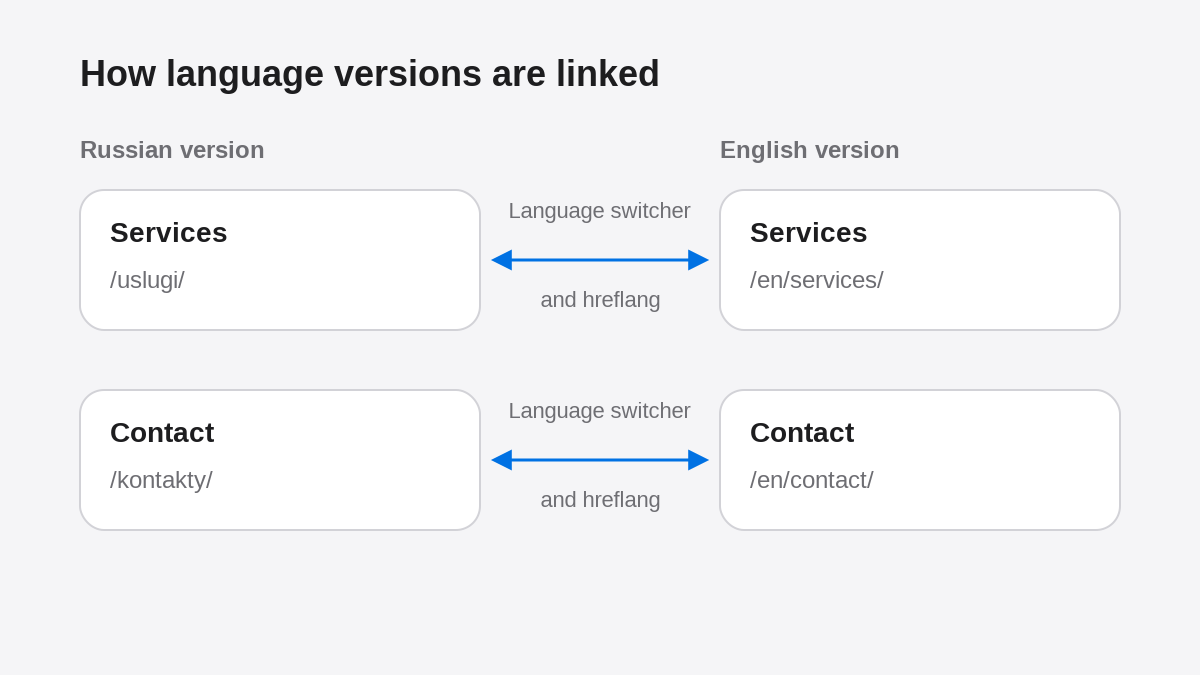
Link each page to its counterpart, rather than simply adding a language prefix to its URL.
For example:
/kontakty/is the Russian contact page./en/contact/is its English version.
This is an example structure, not an Astro requirement. The primary language can use URLs without a prefix, while other languages have their own directories. Astro’s internationalization routing lets you set available languages, the default language, and URL prefix rules.
Routing doesn’t translate the text. It helps put prepared versions at the right URLs. The translations themselves still need to be written, reviewed, and maintained.
There’s another step that’s easy to miss: matching the pages. The switcher on a Russian service page should take visitors to the English version of that same service, if one exists. Linking to the English homepage technically works, but doesn’t help much. Visitors have to find the right section all over again.
URLs may differ in more than just their language prefix. /uslugi/ and /en/services/ can be counterparts. So you can’t always create a translation URL by adding /en/ to the current path. The language versions need explicit links between them.
Search engines use hreflang markup to identify pages that are language alternatives of each other. In its guidance on localized versions, Google recommends that each version link to itself and to the other relevant versions. A language switcher doesn’t do that job.
If a translation doesn’t exist, decide in advance what should happen: hide that language option or provide a clear link to a section in another language. Don’t present a different page as a translation of the current one.
A multilingual site needs ongoing editorial work after launch. If you change a service’s terms in one language, you should update the other versions too. A static site removes the dependency on a multilingual plugin, but it doesn’t remove the work of maintaining translations. For more on keeping a site in good shape after a move, see our guide to website maintenance. If you want to make content changes without opening code, you can use Statico Atelier to describe an edit, review a preview, and publish it with a click.
What to check before switching your domain
I wouldn’t accept a site based only on someone saying, “Everything has been moved.” Use a short set of checks instead. They’re useful with any developer: they help you verify the result rather than assume every integration was included in the migration.
Forms
- Submit a test inquiry and confirm it arrives in the right inbox or CRM. A thank-you message on the page isn’t enough.
- Check that the submission includes every field, including the selected service or inquiry language if the form has those options.
- Make sure visitors see a clear message if submission fails. The developer can show you how this works on a test version.
- Test the form on a phone, including the fields, button, and error messages.
Analytics
- Confirm that the tracking tag sends data to the right account and that the site owner still has access.
- Check that a test visit and an important action, such as a successful form submission, show up in analytics.
- Compare your previous goals with the new site’s behavior. Don’t assume they were preserved just because the visit chart is working.
Language versions
- Use the switcher on internal pages as well as homepages.
- On the test site, check that pages are available at their existing language URLs or that redirects are ready. After switching domains, open some old URLs from bookmarks or search results.
- Check the language of the text, menu, form labels, and submission messages.
- Ask the developer to check
hreflanglinks and what happens on pages without translations.
Pay particular attention to forms: a button that looks fine doesn’t tell you whether the inquiry was delivered.
How to tell if a migration is right for you
At Statico, we build contact forms, analytics, and multilingual versions without WordPress plugins or database overhead. However, moving to a static setup does not mean complex proprietary integrations—such as interactive calculators, customer portals, or booking widgets—are restored out of the box. Check the requirements above to confirm that serverless handlers cover everything your forms and visitor interactions need.