 Statico
WordPress cost for small business: what you really pay
Break down hidden WordPress expenses—hosting renewals, plugin licenses, security maintenance, and DIY hours—versus running a static site for €0/month.
WordPress costs for a small business can be very low if you maintain the site yourself. But you may also need to pay for hosting renewals, a maintenance subscription, plugin licenses, and occasional repairs. The software is free. Keeping a useful business website online is the part you need to budget for.
That does not mean every small business needs an expensive maintenance plan. A carefully managed site with free plugins is a perfectly reasonable option. So is replacing WordPress when the business no longer needs it.
Below is a worked example using Polish supplier prices as of November 16, 2026. It covers an existing business website, not its initial development, advertising, or SEO. It is a partial operating budget, not a claim about the average cost of WordPress in Poland.
WordPress hosting costs: start with the renewal
WordPress software is free to download. You may need to pay for hosting and a domain name, and maintaining the site yourself takes time. This article covers self-hosted WordPress, not the subscription plans sold by WordPress.com.
For hosting, the number I would put in an ongoing budget is the renewal price. The introductory offer belongs in the first-year column, not in your long-term budget.
For example, the wp_START! package in the official cyber_Folks hosting price list has different introductory and renewal prices.
Currency note: To compare these Polish offers with euro-priced services, the calculations below use an illustrative planning rate of €1 = 4 zł. This is an arithmetic assumption, not a claim about the market exchange rate. The Polish suppliers bill in złoty. The Polish supplier prices and calculations based on them exclude VAT.
At that planning rate, the selected hosting package works out to €24.75 for the first year (99 zł) and €82.25 per year at renewal (329 zł), based on the published prices.
Before changing hosts, check what your current package includes. Email, backups, storage, and support vary between providers. A lower hosting bill is less impressive if you then discover that business email needs a separate subscription.
WordPress maintenance cost: separate cash from time
Maintenance is the other major variable. For example, Best Project advertises WordPress maintenance starting at 199 zł a month, equivalent to €49.75 at the planning rate above.
The listed services include updates, backups, uptime monitoring, and content changes. That last item matters: this is not simply a fee for pressing the update button.
Here is the annual budget using that starting price and the selected hosting package:
| Partial annual cash budget | First hosting year | Year at the listed hosting renewal rate |
|---|---|---|
| Hosting alone, with the owner maintaining the site and no paid licenses | €24.75 | €82.25 |
| Maintenance alone at the advertised starting rate, paid monthly | €597.00 | €597.00 |
| Hosting plus that maintenance service | €621.75 | €679.25 |
The maintenance calculation is €49.75 × 12 monthly payments. The figures come from the hosting price list and maintenance offer. These are separate offers combined for this calculation, not a confirmed bundle you can order together.
Neither total that includes hosting covers your domain, email, paid licenses, or separately billed repairs. You should also check what the maintenance service covers and whether any eligibility conditions apply before you buy.
Keep your own time on a separate line:
Owner’s time cost = hours actually spent × an hourly value you choose.
Do not quietly add that to supplier invoices and call the result money spent. Both figures are useful, but they answer different questions: “What leaves the bank account?” and “How much time does this take?”
Can you maintain WordPress yourself?
There is a big difference between “I maintain the site myself” and “nobody maintains the site.” A subscription is one way to make sure someone is responsible. It is not the only way.
For a modest business site, an owner who understands the process may reasonably handle routine work. The job is less about constantly tweaking settings and more about following a repeatable checklist:
- Keep track of WordPress, theme, and plugin updates.
- Keep backups of both the website files and its database, where WordPress stores content and settings.
- Know how to restore a backup, not merely where the backup button lives.
- After changes, check important pages, navigation, and contact forms.
- Remove unused plugins and check whether the remaining ones are still maintained.
- Know who handles the server software and what to do when an update causes trouble.
An update can finish successfully while leaving a contact form looking normal but unable to send inquiries.
Paid plugins are not automatically necessary, either. Budget for the licenses your site actually uses, and check what each renewal provides. Do not fill a spreadsheet with imaginary premium tools just to make WordPress look expensive.
My view: DIY maintenance is reasonable when someone has the knowledge, access, and willingness to take responsibility for it. “I’ll probably notice if something breaks” is not quite the same thing.
When nobody owns the updates, the savings are uncertain
An untouched website is not necessarily an unchanged technical system. Its host can change server settings. Its plugins can receive security fixes. The software beneath WordPress can reach the end of its support period even if your opening hours and service pages stay exactly the same.
PHP, the programming language that runs WordPress on the server, is a useful example. According to the official PHP support schedule, PHP 8.2 receives security support until December 31, 2026.
That does not mean a site will be compromised the following morning. It means that version stops receiving support from the PHP project. A host may have additional arrangements, so ask rather than assume. Someone still needs to know which version the site uses and check compatibility before changing it.
You may also see security notices mentioning a CVE: an identifier for a publicly cataloged vulnerability. A PHP vulnerability and a WordPress plugin vulnerability are different things. Whether either affects your site depends on the affected versions and conditions, not just the presence of a worrying identifier.
For context, Patchstack’s State of WordPress Security in 2026 report reports 11,334 newly identified vulnerabilities in the WordPress ecosystem during 2025. Despite the report’s title, that is not a full-year count for 2026. Patchstack also sells security products, and the count does not tell you the probability that your business will be hacked.
An owner can keep an inventory and apply relevant fixes without paying for maintenance, but an unattended site won’t get those fixes.
Static site vs. WordPress: when is a static site enough?
Before comparing maintenance subscriptions, check whether the website still needs WordPress.
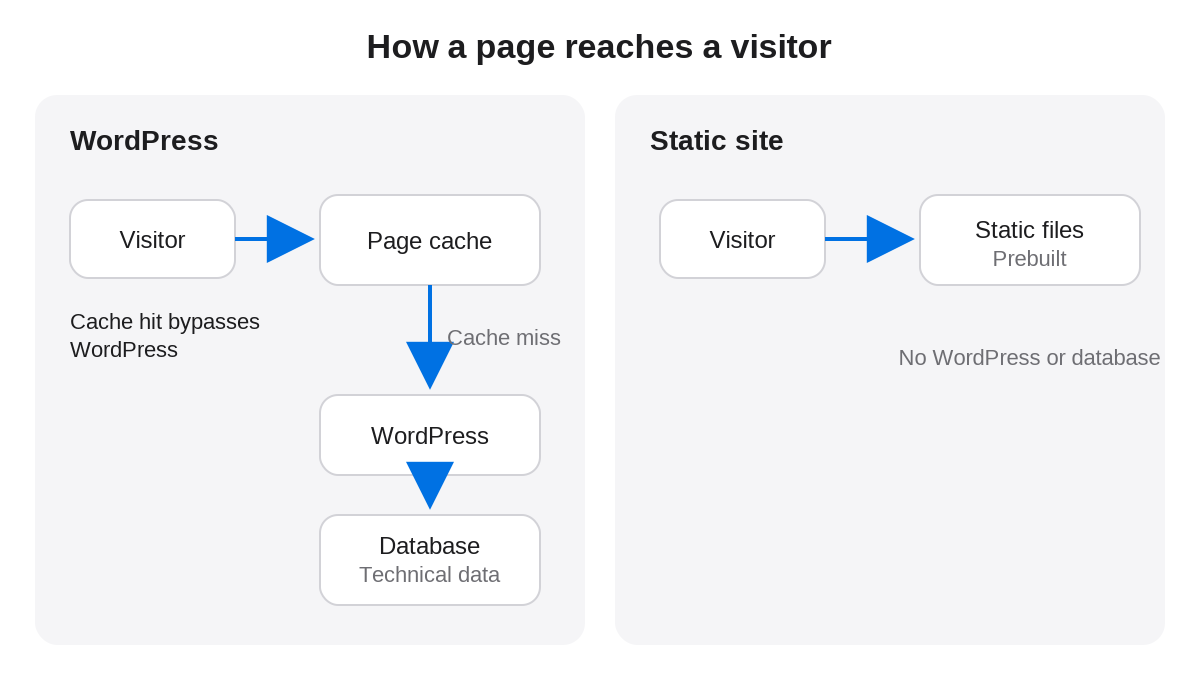
A cache hit can bypass WordPress; a request handled by WordPress still depends on the database.
A static site serves pages prepared ahead of time. WordPress can assemble pages using PHP and a database, or serve cached copies. When WordPress handles a request, it still depends on the database and checks it for technical data, even if page content is cached. A static site can still have interactive elements: “static” does not mean a visitor cannot open a menu or send an inquiry.
For a business site made up mainly of services, opening hours, staff profiles, articles, and a contact form, a static site can be a simpler fit. There is no visitor-facing WordPress installation to update and no WordPress plugin stack to keep compatible.
On a static architecture, you eliminate the database server and PHP runtime entirely, which removes the recurring hosting overhead and paid caching plugins required to keep WordPress fast. Forms send inquiries through lightweight serverless functions, so interactive elements keep working without an active server subscription in the background.
That does not make every WordPress site a migration candidate. A store with a cart, checkout, and customer accounts is not part of the standard migration service. Logins, private sections, and online payments need separate discussion. Comments need a third-party service or must be turned off.
I would also think carefully before removing a publishing workflow that people use every day. If staff depend on familiar editing tools, replacing those tools has a cost even when the new hosting bill is lower.
What switching removes, and what still costs money
As of November 2026, Statico’s migration pricing is €100 for orders placed by December 31, 2026, and €200 for orders placed on or after January 1, 2027, covering up to 20 unique pages. Each additional unique page costs €5; pages using the same template, such as posts or products, cost €0.50 each. That is a migration cost, not an annual maintenance subscription.
The delivered site runs on the free Cloudflare plan in the customer’s own account. The customer owns the code as a standard Astro project. That removes the WordPress hosting requirement for the migrated site, but it does not make every website-related expense disappear.
Here is the distinction I would use when checking potential savings:
| Expense or task | What changes after a suitable static migration? |
|---|---|
| WordPress hosting | Replaced by static hosting on the customer’s Cloudflare account |
| WordPress, theme, and plugin updates | No longer part of operating the migrated site |
| Domain renewal | Still needed |
| Business email | Still needed if the business uses it |
| Text and image changes | Someone still needs to make them |
| Forms and external services | Still need testing and may have their own costs |
| Account security and code backups | Still need an owner |
You will also need a plan for editing without the old admin dashboard. Statico Atelier lets you describe changes in ordinary language, review a preview, and publish a change you approve. Connecting and viewing previews are free; completed edits are paid for using your balance.
This is why I would not subtract the entire maintenance subscription and announce an automatic payback date. If that subscription includes content work, some of the work remains. Domain and email costs remain too. The post-migration maintenance guide is a useful place to check those remaining responsibilities.
Make the decision based on your invoices
Open your hosting renewal notice, your domain invoice, and the list of active subscriptions. Build your own budget from those, not from the cheapest banner in a hosting comparison.
Separate the result into:
- Cash you pay to keep the current setup running.
- Work you do yourself.
- Work you would still need after changing platforms.
- A one-time migration cost, if you are considering moving.
Then write down who checks the forms, who handles updates, and who can restore the site. If those responsibilities already have clear owners and the costs suit the business, keeping WordPress may be the right answer.
If the site mostly presents information and the CMS has become an extra thing to look after, a static version is worth evaluating. Compare the pages and functions before deciding which technology to use.